0013. ts-node 快速入门
- 1. 🎯 本节内容
- 2. 🫧 评价
- 3. 🤔 ts-node 是什么?
- 4. 🤔 ts-node 跟 tsconfig.json 的关系是?
- 5. 🤔 ts-node 跟 node 的关系是?
- 6. 🤔 ts-node 相比 tsc 都有哪些优势?
- 7. 🤔 ts-node 在实际开发中的应用场景主要是?
- 8. 🤔 ts-node 的工作原理是?
- 9. 🤔 如何安装 ts-node?
- 10. 🤔 如何使用 ts-node 直接运行 TypeScript 程序?
- 11. 🤔 项目中的 ts-node 命令一帮写在什么位置?
- 12. 🤔 如何获取 ts-node 的帮助信息?
- 13. 🤔 关于 ts-node 的是一些注意事项都有哪些?
- 14. 💻 demos.1 - 初始化 ts-node 体验环境
- 15. 🔗 引用
1. 🎯 本节内容
- ts-node
2. 🫧 评价
- ts-node 是开发阶段运行 TypeScript 脚本的便捷工具
- ts-node 主要用于开发环境中快速测试 TypeScript 代码,特别适合构建脚本、开发工具和小型项目
- ⚠️ 注意 node 版本,写这篇笔记时(25.10)用的是 nodejs v23,有很多坑,建议切换到 nodejs 的 LTS 版,比如 v22
3. 🤔 ts-node 是什么?
- ts-node 是一个用于直接运行 TypeScript 代码的 Node.js 执行环境和 REPL(交互式解释器)。
- 它允许开发者在不预先将 TypeScript 编译为 JavaScript 的情况下,直接执行 .ts 文件。
主要特点:
- 即时执行:无需预先编译,可以直接运行 TypeScript 代码
- REPL 支持:提供交互式命令行环境,便于测试和学习
- 与 Node.js 兼容:基于 Node.js 构建,支持大部分 Node.js 功能
- TypeScript 编译集成:内部集成了 TypeScript 编译器,实时编译代码
- 开发工具:主要用于开发阶段,提高开发效率
4. 🤔 ts-node 跟 tsconfig.json 的关系是?
- ts-node 会读取 tsconfig.json(通过 --project 指定或在当前目录查找),并使用其中的 compilerOptions 配置(如 target、module、paths 等)。
- 推荐为开发环境维护独立的 tsconfig(例如 tsconfig.dev.json),以便在 ts-node 下使用更宽松或更快速的配置(如启用 transpileOnly 时关闭某些插件)。
5. 🤔 ts-node 跟 node 的关系是?
ts-node = Node.js + TypeScript 实时编译器,专为开发环境设计,让开发者可以直接运行 TypeScript 代码而无需预编译步骤。
- 增强关系:ts-node 是对 Node.js 的增强扩展,它在 Node.js 基础上增加了对 TypeScript 的直接执行能力
- 兼容性:ts-node 完全兼容标准的 Node.js API 和生态系统,可以运行大部分 Node.js 代码
- 执行方式:
- Node.js 直接执行编译后的 JavaScript 文件(.js)
- ts-node 可以直接执行 TypeScript 文件(.ts)并在运行时进行实时编译
- 内部机制:ts-node 内部调用 Node.js 运行时,同时集成了 TypeScript 编译器,在 require.ts 文件时自动进行编译转换
- 命令行接口:ts-node 提供了与 Node.js 类似的命令行接口,可以作为 Node.js 的直接替代品在开发阶段使用
6. 🤔 ts-node 相比 tsc 都有哪些优势?
- 即时执行:ts-node 可以直接运行 TypeScript 代码,无需预先编译成 JavaScript,特别适合开发阶段快速测试和调试
- 简化工作流:省去了编译步骤,开发者可以直接关注代码逻辑而不是构建过程
- REPL 支持:提供了交互式环境,可以逐行执行 TypeScript 代码,便于学习和测试
7. 🤔 ts-node 在实际开发中的应用场景主要是?
适用场景:
- 开发阶段的快速原型验证
- 运行 TypeScript 脚本和工具
- 学习和测试 TypeScript 语法特性
- 不复杂的中小型项目
限制:
- 启动速度较慢,因为需要实时编译
- 不适合生产环境(性能和稳定性考虑)
- 对于大型项目,建议先用 tsc 编译再运行
鸡肋的 ts-node
- TS -> 大型:TS 主要是为开发大型项目准备的,解决繁杂的类型问题。
- ts-node -> 中小型:ts-node 主要是用来快速运行一些简单的
*.ts脚本。 - 这就导致在做一些企业级项目开发的时候,基本上没有 ts-node 的用武之地。而在编写一些中小型的项目时,很多时候又没必要采取那么严格的类型约束,直接上
*.js就完事儿了。 - 综上,感觉
ts-node挺鸡肋的,可能最大的作用就是在你初学 ts 的阶段,提供一种直接运行*.ts模块的功能。
8. 🤔 ts-node 的工作原理是?
对 tsc 进行二次封装,在内存中完成编译并运行,跳过了生成最终编译产物 *.js 的步骤。
- ts-node 在运行时动态编译 TypeScript 代码,内部调用 TypeScript 编译器 tsc API
- 它注册了一个 require 钩子,拦截对 .ts 文件的 require 调用并实时编译
9. 🤔 如何安装 ts-node?
bash
# 建议在项目中作为开发依赖安装
npm install --save-dev ts-node typescript
# 或者用 pnpm / yarn

# 安装后验证版本:
npx ts-node -v
# 或
npx ts-node --version

# 也可以全局安装,但通常不推荐
npm install -g ts-node typescript10. 🤔 如何使用 ts-node 直接运行 TypeScript 程序?
bash
# 直接运行单个文件:
npx ts-node src/app.ts

# 以 REPL 交互式运行:
npx ts-node
# 或使用 ts-node --interactive⚠️ 版本兼容警告(Node 23 REPL 问题)
- 测试版本:
ts-node 10.9.2+Node v23.x - 在 Node 23 下,直接运行
ts-node进入官方 REPL 时,输入单行(如console.log(123);)可能被错误判定为“未结束”持续出现...,无法执行。 - 原因是 Node 23 的 REPL/解析行为更新,ts-node 现有行完整性检测未适配。
现象:
- Node 20 / 22:正常执行并输出结果。
- Node 23:每行后出现
...,需额外空行仍不执行。
解决/规避:
- 使用 LTS 版本:
nvm use 20或nvm use 22 - 等待后续 ts-node 版本修复(可能 11.x 会修复吧)
11. 🤔 项目中的 ts-node 命令一帮写在什么位置?
- 通常写在 package.json 中的 scripts 字段中,调用起来比较方便,比如
npm run xxx。
json
{
  "scripts": {
    "start:ts": "ts-node src/index.ts",
    "dev": "ts-node --transpile-only src/server.ts"
  }
}运行:
bash
npm run start:ts
npm run dev12. 🤔 如何获取 ts-node 的帮助信息?
查看简要帮助:
bash
$ npx ts-node --help
Need to install the following packages:
ts-node@10.9.2
Ok to proceed? (y)


Usage: ts-node [options] [ -e script | script.ts ] [arguments]

Options:

  -e, --eval [code]               Evaluate code
  -p, --print                     Print result of `--eval`
  -r, --require [path]            Require a node module before execution
  -i, --interactive               Opens the REPL even if stdin does not appear to be a terminal

  --esm                           Bootstrap with the ESM loader, enabling full ESM support
  --swc                           Use the faster swc transpiler

  -h, --help                      Print CLI usage
  -v, --version                   Print module version information.  -vvv to print additional information
  --showConfig                    Print resolved configuration and exit

  -T, --transpileOnly             Use TypeScript's faster `transpileModule` or a third-party transpiler
  -H, --compilerHost              Use TypeScript's compiler host API
  -I, --ignore [pattern]          Override the path patterns to skip compilation
  -P, --project [path]            Path to TypeScript JSON project file
  -C, --compiler [name]           Specify a custom TypeScript compiler
  --transpiler [name]             Specify a third-party, non-typechecking transpiler
  -D, --ignoreDiagnostics [code]  Ignore TypeScript warnings by diagnostic code
  -O, --compilerOptions [opts]    JSON object to merge with compiler options

  --cwd                           Behave as if invoked within this working directory.
  --files                         Load `files`, `include` and `exclude` from `tsconfig.json` on startup
  --pretty                        Use pretty diagnostic formatter (usually enabled by default)
  --cwdMode                       Use current directory instead of <script.ts> for config resolution
  --skipProject                   Skip reading `tsconfig.json`
  --skipIgnore                    Skip `--ignore` checks
  --emit                          Emit output files into `.ts-node` directory
  --scope                         Scope compiler to files within `scopeDir`.  Anything outside this directory is ignored.
  --scopeDir                      Directory for `--scope`
  --preferTsExts                  Prefer importing TypeScript files over JavaScript files
  --logError                      Logs TypeScript errors to stderr instead of throwing exceptions
  --noExperimentalReplAwait       Disable top-level await in REPL.  Equivalent to node's --no-experimental-repl-await
  --experimentalSpecifierResolution [node|explicit]
Equivalent to node's --experimental-specifier-resolution13. 🤔 关于 ts-node 的是一些注意事项都有哪些?
- 性能:ts-node 启动比直接运行 JS 慢,生产环境推荐先编译(tsc)再运行输出的 JS。
- 类型检查开销:在开发中可用 --transpile-only 提升速度,并在 CI 中做完整类型检查。
- ESM 配置复杂:使用 ESM 时注意 package.json、tsconfig 和 ts-node 的 ESM 支持文档。
- 相对路径/paths:如果使用 tsconfig 的 paths,运行时需要额外的路径解析(例如 tsconfig-paths/register)。
- 安全:避免直接在受信任度低的环境运行来自不可信来源的 TypeScript 代码(运行时会编译并执行)。
14. 💻 demos.1 - 初始化 ts-node 体验环境
bash
$ pnpm init
# {
#   "name": "1",
#   "version": "1.0.0",
#   "description": "",
#   "main": "index.js",
#   "scripts": {
#     "test": "echo \"Error: no test specified\" && exit 1"
#   },
#   "keywords": [],
#   "author": "",
#   "license": "ISC",
#   "packageManager": "pnpm@10.15.1"
# }

$ pnpm i typescript ts-node -D
#    ╭──────────────────────────────────────────╮
#    │                                          │
#    │   Update available! 10.15.1 → 10.18.3.   │
#    │   Changelog: https://pnpm.io/v/10.18.3   │
#    │     To update, run: pnpm add -g pnpm     │
#    │                                          │
#    ╰──────────────────────────────────────────╯

# Packages: +20
# ++++++++++++++++++++
# Progress: resolved 20, reused 4, downloaded 16, added 20, done

# devDependencies:
# + ts-node 10.9.2
# + typescript 5.9.3

# Done in 1.4s using pnpm v10.15.1json
{
  "name": "1",
  "version": "1.0.0",
  "description": "",
  "main": "index.js",
  "scripts": {
    "test": "echo \"Error: no test specified\" && exit 1",
    "ts-node": "ts-node",
    "ts-node-showConfig": "ts-node --showConfig",
    "ts-node-run": "ts-node src/index.ts"
  },
  "keywords": [],
  "author": "",
  "license": "ISC",
  "packageManager": "pnpm@10.15.1",
  "devDependencies": {
    "ts-node": "^10.9.2",
    "typescript": "^5.9.3"
  }
}bash
# 启动 ts-node 的 repl 交互环境
$ pnpm ts-node

# 查看 ts-node 加载的 tsconfig.json 的配置
$ pnpm ts-node-showConfig

# 使用 ts-node 执行运行 src/index.ts 模块
$ pnpm ts-node-runts
require('./1')
require('./2')

// 后续有啥要测试的 ts 脚本,继续新建即可,比如 3.ts、4.ts ……
// 需要执行查看结果的,可以在 index.ts 这个根模块中引入ts
const sum = (a: number, b: number): number => a + b

console.log(sum(1, 2))ts
const input: string = 'HELLO WORLD'
const output: string = input.toLowerCase()

console.log(`原字符串: ${input}`)
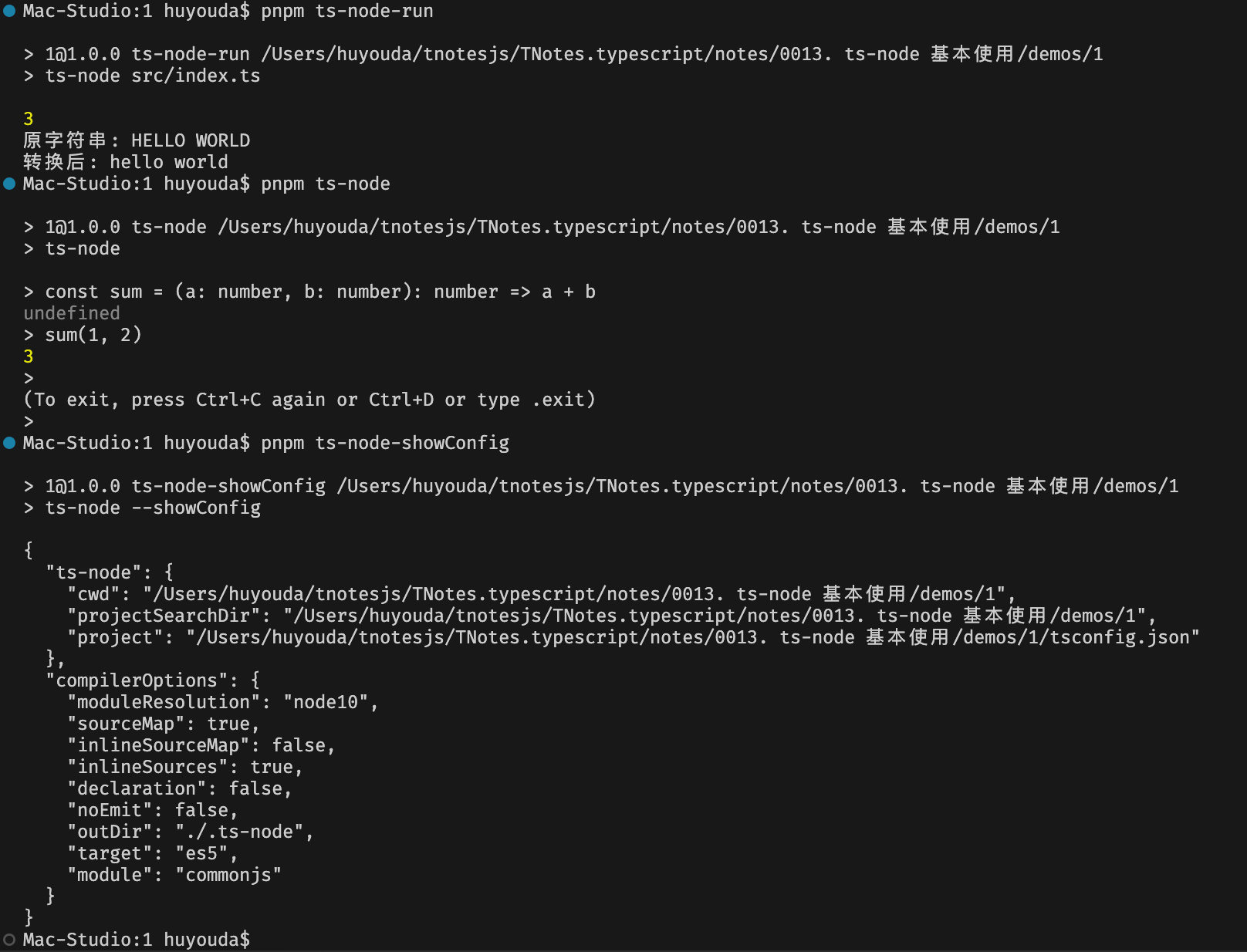
console.log(`转换后: ${output}`)json
{
  "compilerOptions": {
    "moduleResolution": "node"
  }
}下面是执行配置的 ts-node 命令后打印的结果: