



0026. 联合类型
- 1. 🎯 本节内容
- 2. 🫧 评价
- 3. 🤔 什么是联合类型(Union Types)?
- 4. 🤔 联合类型中的“类型收窄”(Type Narrowing)是什么?
- 5. 🤔 联合类型有哪些常见用法?
- 6. 🆚 联合类型 vs. 函数重载
- 7. 🤔 联合类型(
|)与交叉类型(&)的区别 - 8. 🤔 联合类型如何与 TS 内置类型工具配合使用?
- 9. 🔗 引用
1. 🎯 本节内容
- 联合类型(Union Types)
- 类型收窄(Type Narrowing)
- 也叫 “类型缩小”
- 类型守卫(Type Guards)
- 函数重载
- Exclude
- Extract
2. 🫧 评价
- “联合类型” 顾名思义,就是将类型组合在一起形成一个新的类型 xxx,表示 “xxx 可以是这些类型中的任意一种”。
- 联合类型的使用规律:
- 定义变量阶段 -> 类型放大 Type Widening。在定义变量的时候,我们使用联合类型,相当于将多个类型合并,表示这个变量可以是这些类型中的任意一个。
- 使用变量阶段 -> 类型缩小 Type Narrowing。在使用变量的时候,我们需要明确变量具体的类型,这时候就需要使用「类型收窄(Type Narrowing)」和「类型守卫(Type Guards)」来配合联合类型进行“类型缩小”。
- 关键点总结:
| 关键点 | 说明 |
|---|---|
| 核心符号 | |(竖线) |
| 核心价值 | 精确描述"多态"值,同时保持类型安全 |
| 使用流程 | 通过类型守卫进行类型收窄后使用 |
| 高级模式 | 可辨识联合(Discriminated Unions) |
| 最佳实践 | 与字面量类型、as const、类型守卫结合使用 |
| 反模式 | 与 any 混用,或创建过于宽泛的联合,导致联合类型滥用 |
3. 🤔 什么是联合类型(Union Types)?
联合类型(Union Types) 是 TypeScript 类型系统中最核心、最强大的特性之一。它允许一个变量、参数或属性的类型是多个类型中的任意一个,从而精确描述 “可能有多种形态” 的值。掌握联合类型,是写出灵活又安全的 TypeScript 代码的关键。
联合类型使用 |(竖线) 符号将多个类型组合在一起,表示"这个值可以是这些类型中的任意一种"。
JavaScript 本身是动态类型的,一个变量在不同场景下可能有不同类型。联合类型让 TypeScript 能精确建模这种现实,而不是强行用 any 或宽泛类型(如 string)掩盖问题。
基本语法:
ts
type MyType = TypeA | TypeB | TypeC
// 顺序无关
// 等效于 type MyType = TypeB | TypeC | TypeA示例:
ts
let id: string | number
id = 'user123' // ✅
id = 42 // ✅
id = true // ❌ 错误!boolean 不在联合类型中

let x: string | number
x = 123 // 正确
x = 'abc' // 正确

let setting: true | false
let gender: 'male' | 'female'小技巧:联合类型的第一个成员前面,也可以加上竖杠 |,这样便于多行书写。
ts
let colors:
  | 'c-1'
  | 'c-2'
  | 'c-3'
  | 'c-4'
  | 'c-5'
  | 'c-6'
  | 'c-7'
  | 'c-8'
  | 'c-9'
  | 'c-10'
// ...典型场景:
- 函数参数可以接受多种类型(如 id 可以是字符串或数字)
- API 返回的数据可能有多种结构(如成功/失败响应)
- 状态机中的不同状态(如加载中/成功/错误)
- 可选值(如
T | undefined)
4. 🤔 联合类型中的“类型收窄”(Type Narrowing)是什么?
联合类型中的“类型收窄”(Type Narrowing)是通过运行时检查,TypeScript 能在代码分支中“收窄”类型,从而安全访问特定类型的属性。
在未收窄类型前,你只能访问所有类型共有的属性或方法。
ts
function getLength(input: string | string[]) {
  // string 有 length,string[] 也有 length
  return input.length // ✅ 安全!
}

function getName(input: string | number) {
  return input.length // ❌ 错误!number 没有 length
}示例:处理 string | number
ts
function printId(id: string | number) {
  if (typeof id === 'string') {
    // 在这个分支中,id 被收窄为 string
    console.log(id.toUpperCase()) // ✅ 安全
  } else {
    // 在这个分支中,id 被收窄为 number
    console.log(id.toFixed(2)) // ✅ 安全
  }
}补充:常见的类型守卫(Type Guards)写法
| 检查方式 | 适用类型 |
|---|---|
typeof x === "string" | string |
typeof x === "number" | number |
typeof x === "boolean" | boolean |
x !== null | 排除 null |
x != null | 排除 null 和 undefined |
"prop" in x | 检查对象是否有某属性 |
x instanceof MyClass | 检查实例类型 |
| 自定义类型守卫函数 | 任意复杂逻辑 |
| …… | …… |
5. 🤔 联合类型有哪些常见用法?
ts
// 与字面量类型结合(联合类型最常见的用法)
// 联合类型常与字面量类型搭配,定义有限的取值集合
type Theme = 'light' | 'dark' | 'auto'
type HttpMethod = 'GET' | 'POST' | 'PUT' | 'DELETE'ts
// 使用联合类型表示可能为空的值
// 启用 strictNullChecks 后,所有可能为 undefined 的值都必须显式声明为联合类型。
function findUser(id: number): User | undefined {
  // 可能找不到用户
}

const user = findUser(1)
if (user) {
  // user 被收窄为 User
  console.log(user.name)
}ts
// 使用联合类型完成状态建模
// 这是联合类型的高级用法,通过一个公共的“判别属性”(discriminant) 来区分不同形态。
type LoadingState = { status: 'loading' }
type SuccessState = { status: 'success'; data: string }
type ErrorState = { status: 'error'; message: string }

type RequestState = LoadingState | SuccessState | ErrorState

function handleState(state: RequestState) {
  switch (state.status) {
    case 'loading':
      // state 类型自动收窄为 LoadingState
      showSpinner()
      break
    case 'success':
      // state 类型自动收窄为 SuccessState
      displayData(state.data) // ✅ 安全访问 data
      break
    case 'error':
      showError(state.message) // ✅ 安全访问 message
      break
  }
}
// 这种模式被称为 “可辨识联合”(Discriminated Union) 或 "标签联合"(Tagged Union)
// 是 TypeScript 中实现类型安全状态机的黄金标准6. 🆚 联合类型 vs. 函数重载
- 可以使用联合类型作为函数重载的替代写法,不过通常不太推荐。
- 除非重载需要罗列所有可能组合的情况,否则还是建议使用函数重载。
ts
// 【1】传统重载的写法(推荐)
function combine(a: string, b: string): string
function combine(a: number, b: number): number
function combine(a: string | number, b: string | number): string | number {
  if (typeof a === 'string' && typeof b === 'string') {
    return a + b
  }
  if (typeof a === 'number' && typeof b === 'number') {
    return a + b
  }
  throw new Error('Types must match')
}

// 【2】使用联合类型 + 类型守卫的写法:(不推荐)
function combine(a: string | number, b: string | number): string | number {
  if (typeof a === 'string' && typeof b === 'string') {
    return a + b
  }
  if (typeof a === 'number' && typeof b === 'number') {
    return a + b
  }
  throw new Error('Types must match')
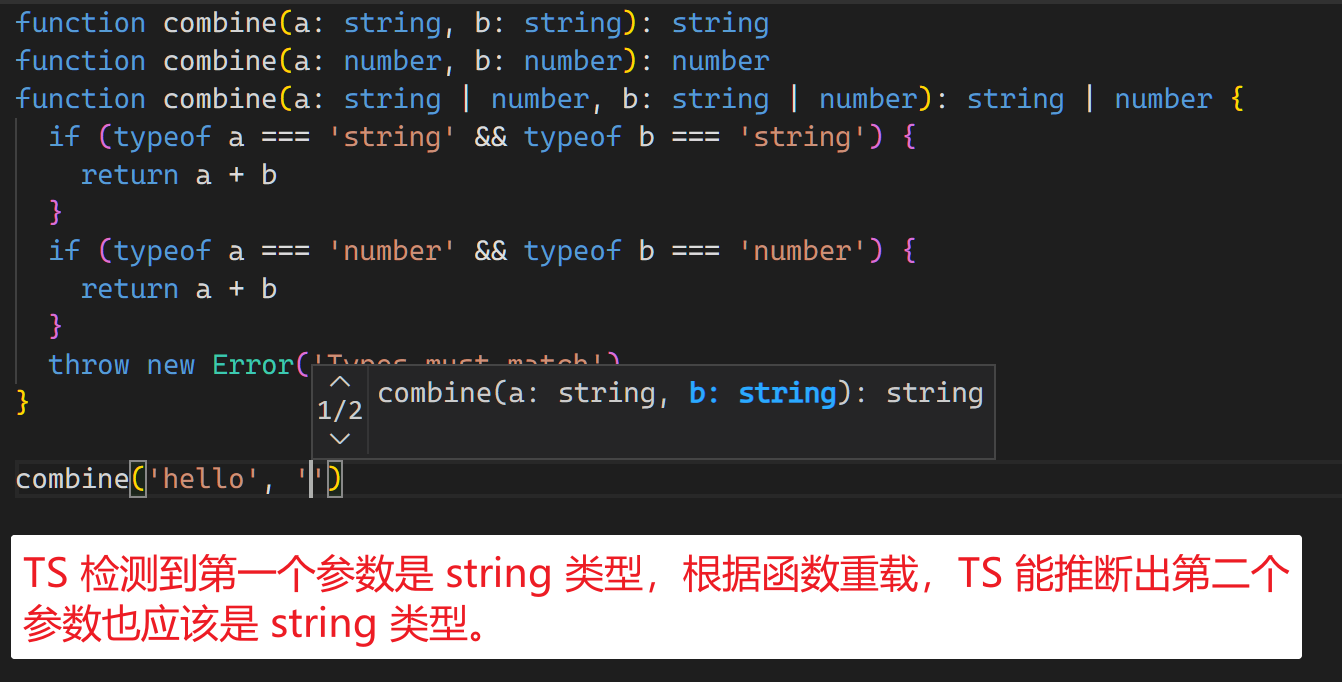
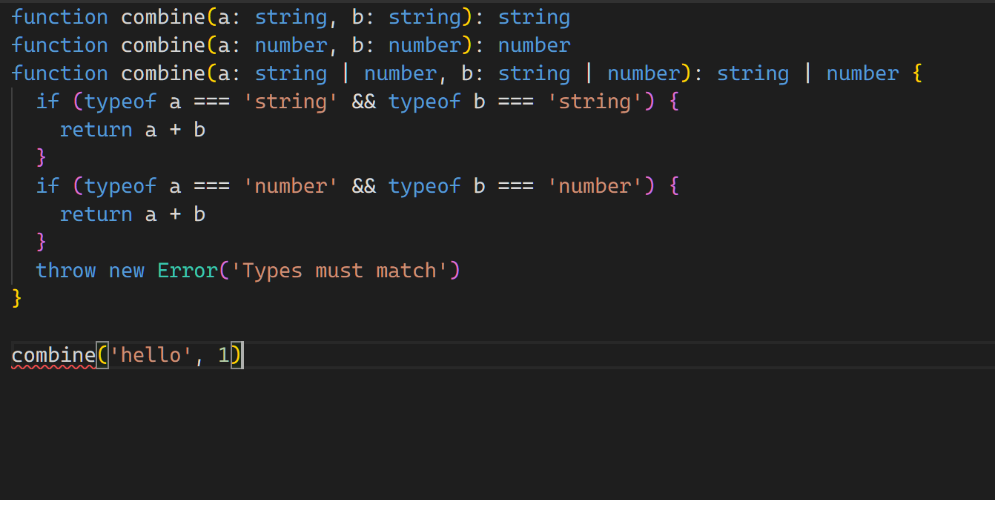
}- 【1】函数重载能对函数调用进行约束,比如你传入了第一个参数是 string,TS 能够识别出第二个参数只能是 string,如果你传错了,那么会立刻提示错误。并且如果你传入了两个 string 类型,那么 TS 也能推断出返回值的类型一定是 string 类型。
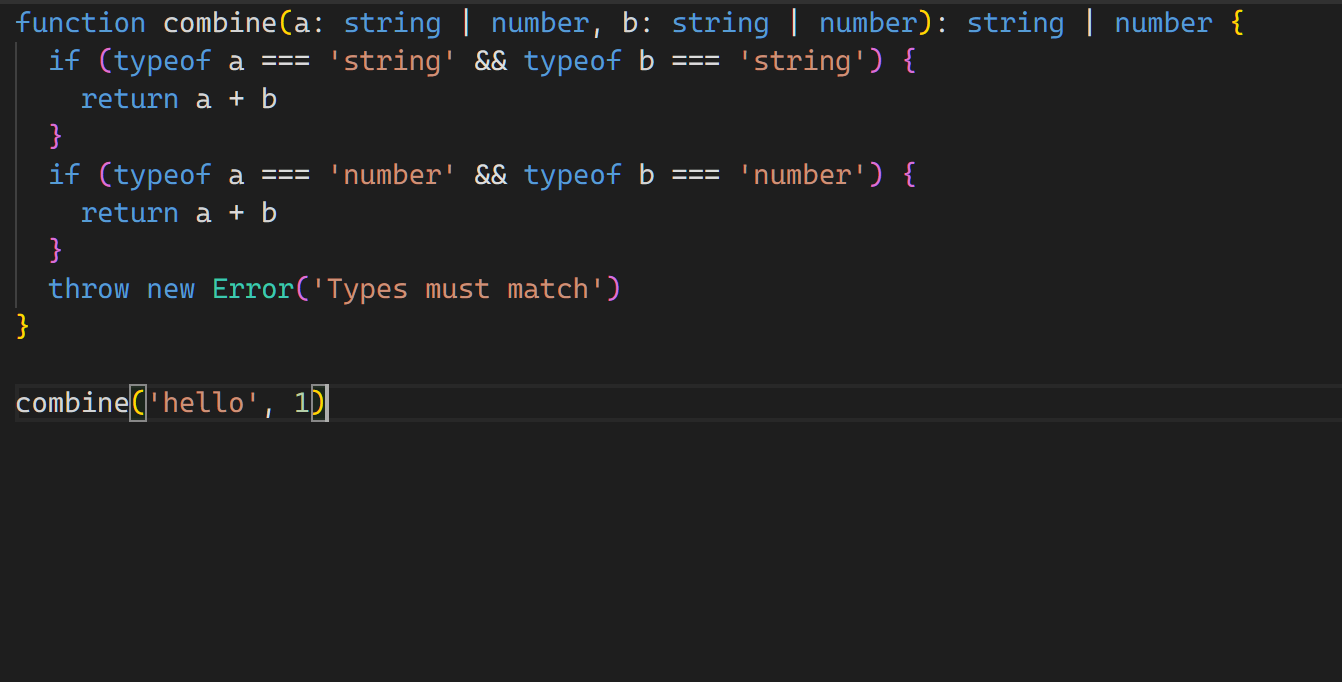
- 【2】但是如果使用的是联合类型,那么你可以任意组合 a、b 的类型,即便传递了一个 string 一个 number,也是不会报错的。即便你传入了两个 string 类型,TS 依旧会认为返回值是联合类型 string | number。
- 如果你的 combine 函数的逻辑就是做拼接,不在意传入的参数之间的类型关系,使用联合类型写起来会更加简洁一些。
ts
// 【1】传统重载的写法(不推荐)
function combine(a: string, b: string): string
function combine(a: string, b: number): string
function combine(a: number, b: string): string
function combine(a: number, b: number): string
function combine(a: string | number, b: string | number) {
  return a.toString() + b.toString()
}

// 【2】使用联合类型(推荐)
function combine(a: string | number, b: string | number) {
  return a.toString() + b.toString()
}7. 🤔 联合类型(|)与交叉类型(&)的区别
- 联合类型
A | B:值是 A 或 B - 交叉类型
A & B:值同时是 A 和 B(拥有两者的全部属性)
ts
type A = { x: string }
type B = { y: number }

type Union = A | B // 要么有 x,要么有 y
type Intersection = A & B // 必须同时有 x 和 y

const a: Union = { x: '1' } // ok
const b: Union = { y: 1 } // ok
const c: Union = { x: '1', y: 1 } // ok
const d: Intersection = { x: '1', y: 1 } // ok
const e: Intersection = { x: '1' } // error
// Type '{ x: string; }' is not assignable to type 'Intersection'.
// Property 'y' is missing in type '{ x: string; }' but required in type 'B'.(2322)8. 🤔 联合类型如何与 TS 内置类型工具配合使用?
ts
// 【1】可以使用 Exclude 工具类型移除联合类型中的某些成员
type Status = 'idle' | 'loading' | 'success' | 'error'
type NotIdle = Exclude<Status, 'idle'> // "loading" | "success" | "error"

// 【2】可以使用 Extract 提取联合类型中的某些成员
type Events = 'click' | 'scroll' | 'keydown'
type MouseEvents = Extract<Events, 'click' | 'scroll'> // "click" | "scroll"

// ... TS 内置的类型工具还有很多,后续会介绍到,也支持自定义类型工具来完成类型运算。

// 补充一嘴:
// 【2】看起来似乎很蠢,为什么不直接写【3】这样:
// 【3】type MouseEvents = 'click' | 'scroll'
// 【3】还更加简洁一些不是吗?

// 实际上使用【2】中的 Extract 会更好一些

// 安全层面:
type Events = 'click' | 'scroll' | 'keydown'
type MouseEvents = Extract<Events, 'click' | 'scrol'> // "click"
// 你不小心把 scroll 错写成 scrol,那么 MouseEvents 就只有一个有效的 "click"

// 语义层面:
// 除了安全层面的优化,还有语义层面的优化。
// Extract<Events, 'click' | 'scrol'> 这句话隐含了一层含义
// 就是后边罗列的这些类型,是属于 Events 的子集