- 如何使用 BrowserView 加载外部资源
- 这个 demo 使用 BrowserView 模块来加载第三方资源(掘金主页)到渲染进程的页面上。
1. 视频
2. TODO 为啥 BrowserView 被废弃掉了
- 注意,最新版的 Electron,已经将 BrowserView 这个 API 被标注为 Deprecated。这个稍微注意下,找时间看看是啥情况,为啥 BrowserView 被废弃掉了。
3. links
- https://www.electronjs.org/zh/docs/latest/api/browser-view
- Electron,查看有关 BrowserView 模块的相关描述。
- https://www.electronjs.org/zh/docs/latest/api/browser-window#winsetbrowserviewbrowserview-experimental-deprecated
- 查看 win.setBrowserView(browserView) 接口说明文档。注意:这 API 已经不再被推荐使用了。
4. demo
// index.js
const { app, BrowserView, BrowserWindow } = require('electron')

app.whenReady().then(() => {
  const win = new BrowserWindow({ width: 800, height: 600 })
  win.loadFile('./index.html')

  const view = new BrowserView()
  win.setBrowserView(view)
  view.setBounds({ x: 200, y: 150, width: 400, height: 300 })
  view.webContents.loadURL('https://juejin.cn')
})
const view = new BrowserView()创建子窗口。win.setBrowserView(view)在 win 窗口中嵌入子窗口 view。view.setBounds({ x: 200, y: 150, width: 400, height: 300 })- 设置 x,y 坐标,窗口宽度和高度。
- 让子窗口居中展示出来。
view.webContents.loadURL('https://juejin.cn')加载页面。
<!-- index.html -->
<!DOCTYPE html>
<html lang="en">
  <head>
    <meta charset="UTF-8" />
    <meta name="viewport" content="width=device-width, initial-scale=1.0" />
    <title>BrowserWindow 窗口</title>
  </head>
  <body>
    <h1 style="text-align: center;">
      在 BrowserWindow 窗口下嵌入 BrowserView 窗口
    </h1>
  </body>
</html>
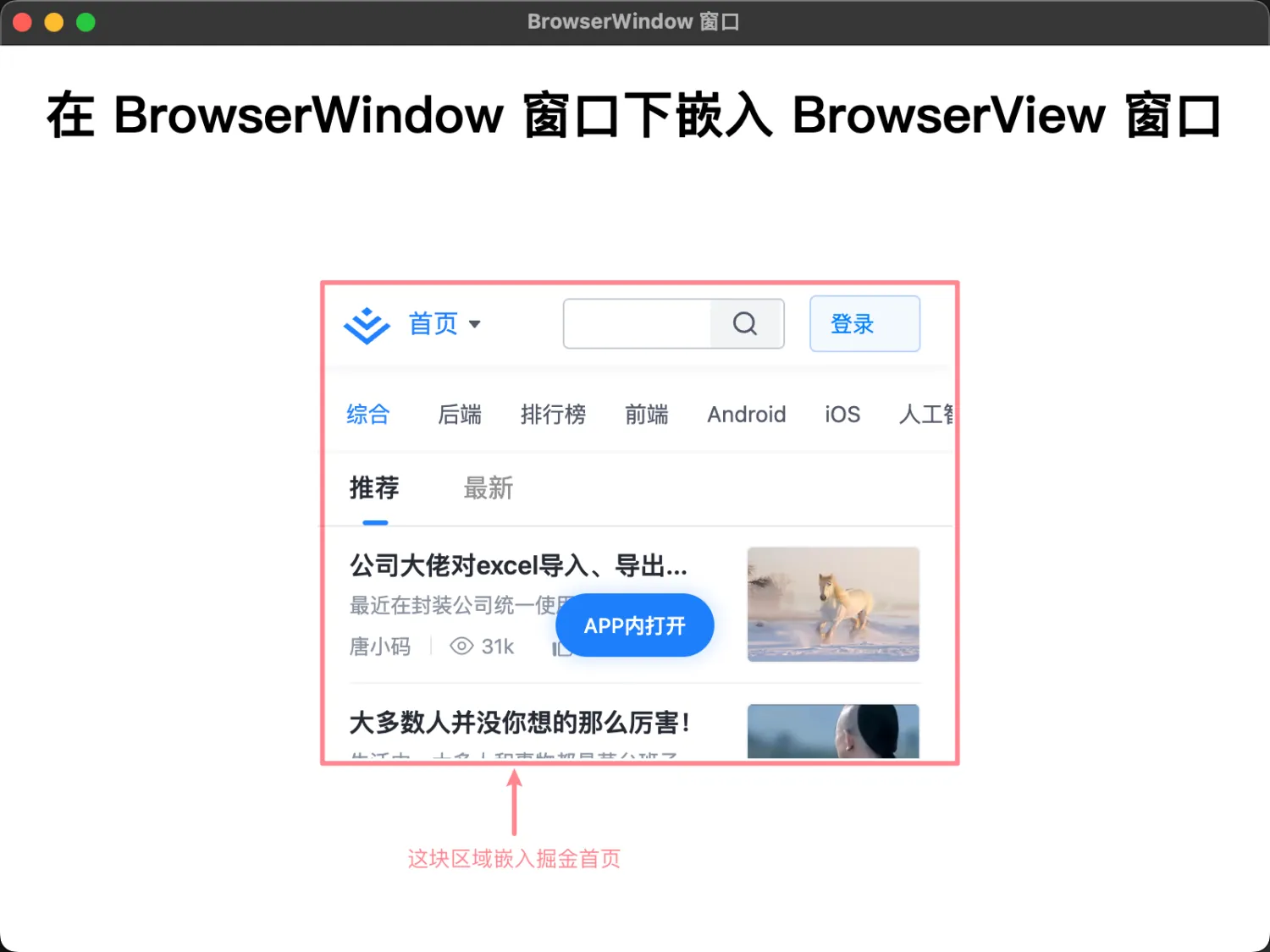
最终效果
在我们本地的 index.html 渲染进程中,嵌入了一个 https://juejin.cn/ 窗口。
Discussions
正在载入评论…