1. demos.1 - 使用 web api MessageChannel 实现主进程和渲染进程之间的互相通信
- 主进程有 MessageChannelMain 模块,渲染进程可以使用 Web API MessageChannel。
- 用哪个模块都可以实现通信的目的,差异在于通信的端口是在主进程生产还是在渲染进程生产。
const { app, BrowserWindow, ipcMain } = require('electron')

// 创建窗口方法
const createWindow = () => {
  const win = new BrowserWindow({
    width: 800,
    height: 600,
    webPreferences: {
      nodeIntegration: true,
      contextIsolation: false,
    },
  })

  win.loadFile('./index.html')

  win.webContents.openDevTools()
}

// whenReady 是一个生命周期方法,当 Electron 完成初始化后会调用这个方法
app.whenReady().then(() => {
  createWindow()
})

ipcMain.on('port', (event) => {
  // [!code highlight]
  // 拿到渲染进程给我传递过来的 port2
  const port = event.ports[0]

  port.on('message', (event) => {
    // [!code highlight]
    console.log('渲染进程给我传递过来的信息为:', event.data)
    port.postMessage('我收到你的消息了,周末出来玩呗~') // [!code highlight]
  })

  // 开启这个端口 - 这意味着两者之间可以进行通信了
  port.start() // [!code highlight]
})最终效果
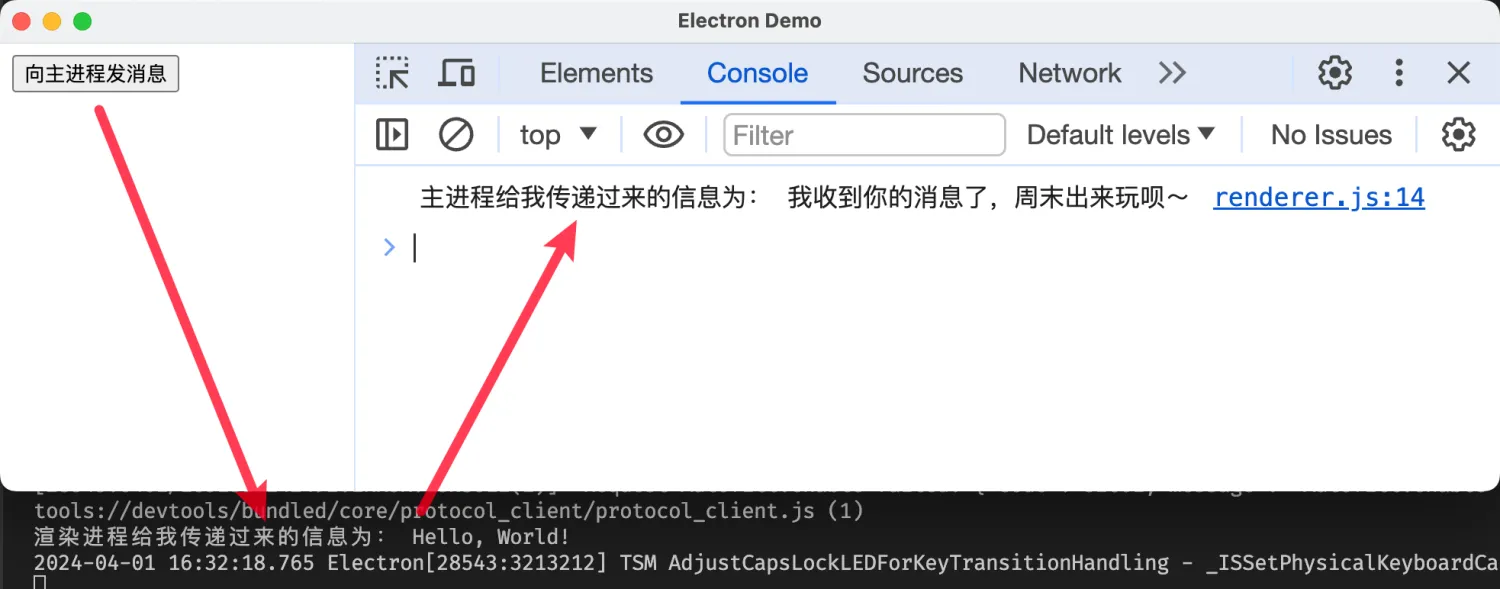
- 在渲染进程点击按钮【向主进程发消息】
- 主进程将收到一条消息【Hello, World!】
- 主进程再给渲染进程回复一条消息【我收到你的消息了,周末出来玩呗~】
Discussions
正在载入评论…