1. 本节内容
这一节将通过一个简单的 demo 来了解 ipcRenderer.send、ipcMain.on 的一种基本用法。
2. demos.1 - 使用 ipcRenderer.send、ipcMain.on 实现从渲染进程到主进程的单向 IPC 通信
const { app, BrowserWindow, ipcMain } = require('electron')

let win
function createWindow() {
  win = new BrowserWindow({
    webPreferences: {
      nodeIntegration: true,
      contextIsolation: false,
    },
  })

  win.webContents.openDevTools()

  win.loadFile('./index.html')
}

function handleIPC() {
  ipcMain.on('message-from-renderer', (event, ...args) => {
    console.log('主进程收到了来自渲染进程的消息')
    console.log('渲染进程在发送 message-from-renderer 请求时,传递的参数如下:')
    console.log(...args)
  })
}

app.on('ready', () => {
  createWindow()
  handleIPC()
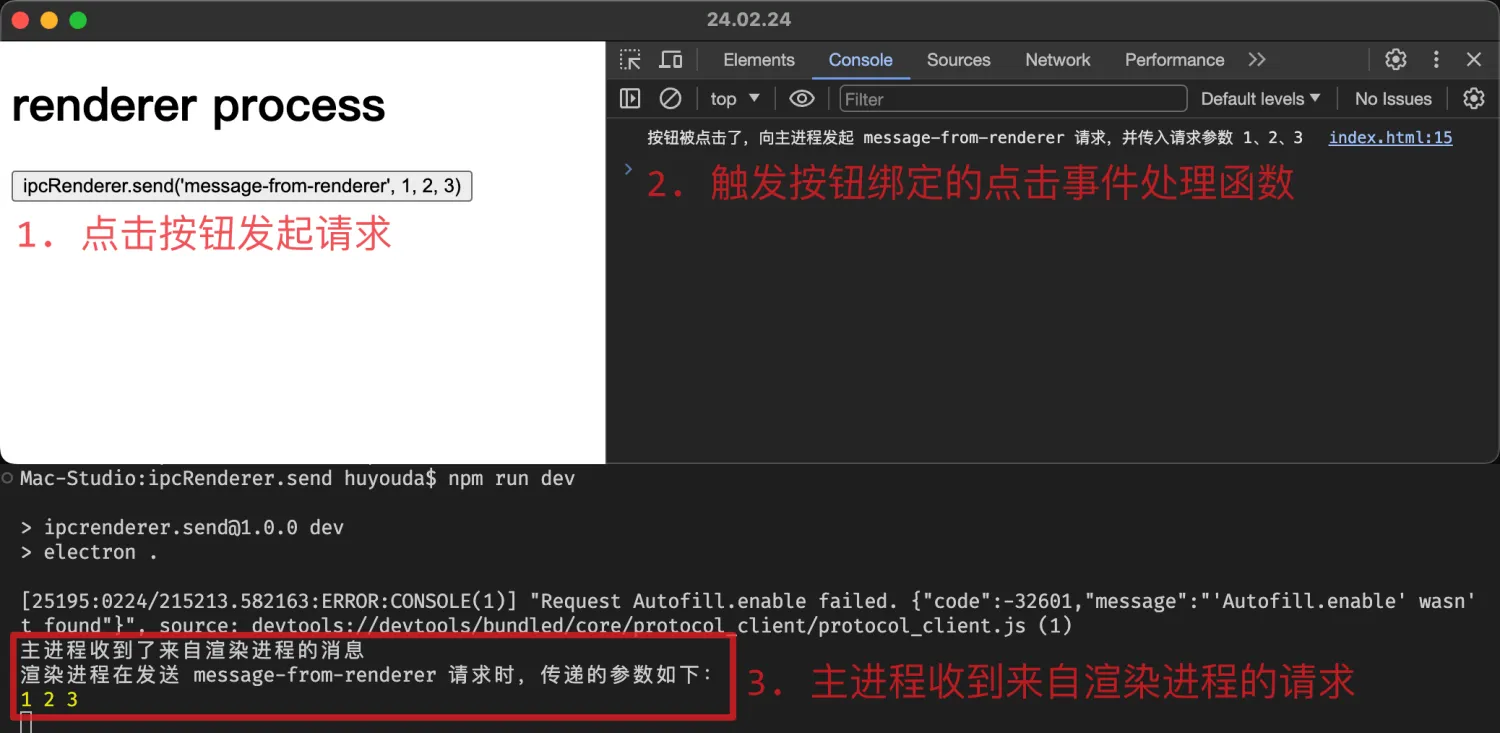
})最终效果:渲染进程使用 ipcRenderer.send 发送消息给主进程,主进程通过 ipcMain.on 对渲染进程发送过来的消息进行监听,实现【渲染进程】到【主进程】的【单向 IPC 通信】。
Discussions
正在载入评论…